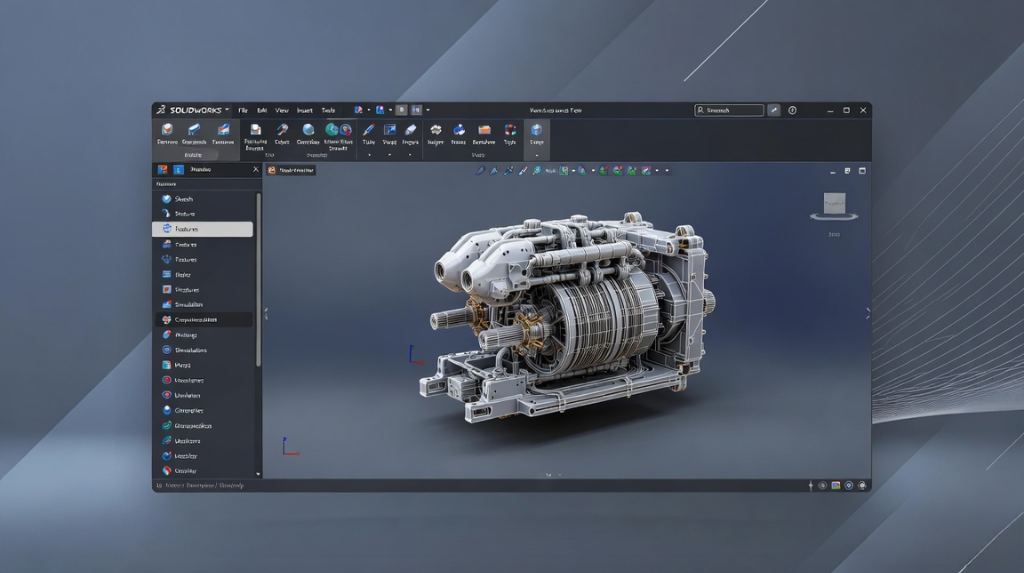
Introduction to SOLIDWORKS 2026
In the world of product development, innovation moves fast. Engineers, designers, and manufacturers constantly seek smarter tools that help them design faster, collaborate better, and deliver more accurate products. That is exactly where SOLIDWORKS 2026 steps in.
As one of the world’s leading CAD software platforms, SOLIDWORKS continues to evolve to meet the changing demands of modern engineering. The latest version of SOLIDWORKS introduces intelligent enhancements that improve productivity, streamline workflows, and elevate design precision.
From AI-assisted tools to faster handling of complex assemblies, improved cloud collaboration, enhanced simulation capabilities, and workflow automation, SOLIDWORKS 2026 is designed for engineers who want to stay ahead. Whether you are a professional product designer, a mechanical engineer, or someone learning mechanical design software, this update brings exciting capabilities worth exploring.
AI Powered Design Enhancements:
One of the most exciting additions in SOLIDWORKS 2026 is its stronger focus on artificial intelligence and smart engineering workflows. AI is no longer a futuristic concept in design software; it is now becoming an everyday productivity accelerator.
Smarter AI-Assisted Tools
The introduction of enhanced AI-assisted tools helps users automate repetitive design tasks, improve decision-making, and reduce engineering bottlenecks.
These tools can support:
- Faster feature recognition
- Smart geometry suggestions
- Automated design corrections
- Improved parametric modeling recommendations
For engineers working on repetitive product configurations, this significantly reduces manual effort.
Better Assembly Design Automation
Large product assemblies often require constant adjustments, alignment checks, and dependency management. SOLIDWORKS 2026 improves assembly design through more intelligent automation features that simplify:
- Mate suggestions
- Assembly conflict detection
- Constraint recommendations
- Component placement optimization
This level of engineering automation helps design teams focus on creativity rather than repetitive corrections.
Enhanced AI Design Experience
The role of AI in SOLIDWORKS is not to replace engineers, but to improve the overall design experience.
Benefits include:
- Faster concept iteration
- Reduced modeling errors
- Improved design intelligence
- Quicker engineering decisions
For modern product teams, AI becomes a collaborative assistant rather than just another feature.
Improved Collaboration and Cloud Connectivity:
Engineering today is rarely done in isolation. Teams are often spread across multiple departments, locations, or even countries. That makes seamless collaboration essential. SOLIDWORKS 2026 significantly improves connected engineering workflows.
Better Cloud Collaboration
Enhanced cloud collaboration allows design teams to work more efficiently without depending heavily on local file transfers.
Teams can:
- Share designs instantly
- Review models remotely
- Manage approvals faster
- Track version history more effectively
This is especially useful for distributed engineering teams.
Improved Data Synchronization
Poor version control creates confusion, delays, and design rework. SOLIDWORKS 2026 introduces stronger data synchronization capabilities that keep files updated across connected platforms.
Advantages include:
- Reduced duplication
- Better version consistency
- Improved project transparency
- Faster team coordination
This creates a smoother product development cycle.
Faster Performance and Assembly Management:
Performance has always been critical in professional mechanical engineering software. As products become more sophisticated, CAD systems must handle increasingly large assemblies without slowing engineers down.
SOLIDWORKS 2026 delivers meaningful speed improvements.
Better Handling of Complex 3D Models
Designing industrial equipment, automotive systems, machinery, or consumer products often involves highly detailed complex 3D models. SOLIDWORKS 2026 improves memory management and rendering efficiency to help reduce slowdowns.
This helps users:
- Open large assemblies faster
- Rotate models more smoothly
- Edit features with less delay
- Improve overall responsiveness
Reduced Lag During Design Sessions
Nothing interrupts creativity like system lag. The new performance optimizations help reduce lag, particularly when:
- Working with detailed assemblies
- Performing rebuild operations
- Switching configurations
- Managing imported geometry
The result is a smoother engineering experience.
Enhanced Drawing and Documentation Tools:
Engineering drawings remain essential despite advances in 3D modeling. Manufacturing teams rely heavily on clear documentation for production accuracy. SOLIDWORKS 2026 improves drafting workflows significantly.
Better SOLIDWORKS Drafting Tools
Enhanced SOLIDWORKS drafting features make drawing creation faster and cleaner.
Improvements include:
- Faster annotation placement
- Better dimensioning workflows
- Improved drawing template management
- Cleaner formatting consistency
This helps engineers create production-ready documentation with less effort.
Improved Drawing Creation Accuracy
Accurate drawing creation is critical to preventing manufacturing errors. SOLIDWORKS 2026 introduces refinements that improve:
- View alignment
- Dimension intelligence
- Annotation precision
- Cross-sheet consistency
This improves overall design accuracy.
Stronger Technical Documentation Support
Good technical documentation is essential for engineering communication. SOLIDWORKS 2026 improves support for documentation workflows involving:
- Assembly instructions
- Manufacturing drawings
- Design revision notes
- Product release packages
This helps engineering teams communicate more effectively with production teams.
Advanced Simulation and Analysis Features:
Simulation has become essential for reducing development risks and validating designs before manufacturing. SOLIDWORKS 2026 expands its analysis capabilities.
Better Thermal Simulations
Thermal performance matters in many industries, including electronics, automotive, and industrial machinery. Enhanced thermal simulations help engineers better predict:
- Heat distribution
- Temperature concentration
- Cooling efficiency
- Thermal failure risks
This leads to more reliable product performance.
Improved Stress Analysis
Design validation becomes stronger with upgraded stress analysis tools. Engineers can better evaluate:
- Structural strength
- Load resistance
- Material performance
- Fatigue risk
Improved visualization makes results easier to interpret.
More Accurate Motion Studies
Motion behavior affects mechanical performance. SOLIDWORKS 2026 improves motion studies, helping teams analyze:
- Moving assemblies
- Mechanical interactions
- Dynamic behavior
- Interference during motion
This supports smarter mechanical design decisions.
Reduced Material Waste and Development Costs
Simulation-driven engineering helps reduce trial-and-error prototyping.
Benefits include:
- Lower material consumption
- Fewer physical prototypes
- Faster validation cycles
- Reduced development costs
This supports more efficient engineering workflows.
User Interface and Workflow Improvements:
Software productivity depends heavily on usability. SOLIDWORKS 2026 introduces practical usability upgrades.
Cleaner SOLIDWORKS User Interface
The improved SOLIDWORKS user interface focuses on speed, clarity, and accessibility.
Enhancements include:
- Better toolbar organization
- Cleaner icon layouts
- Faster command access
- Reduced visual clutter
This helps engineers focus better during complex design work.
Better Workflow Automation
Engineering teams often repeat many manual steps. Enhanced workflow automation features simplify:
- File organization
- Design approvals
- Change tracking
- Repetitive modeling tasks
For organizations seeking workflow automation software capabilities within CAD ecosystems, this is highly valuable.
Benefits of Upgrading to SOLIDWORKS 2026:
Faster Design Speed:
SOLIDWORKS 2026 improves design speed through:
- Performance optimization
- AI-assisted productivity
- Smarter workflows
- Reduced interruptions
Engineers spend more time designing and less time waiting.
Support for Digital Transformation:
Manufacturers increasingly adopt connected engineering ecosystems. SOLIDWORKS 2026 supports digital transformation through:
- Cloud-enabled collaboration
- Integrated data workflows
- Smart engineering automation
- Simulation-driven development
Alignment with Smart Manufacturing:
The future of production is intelligent. SOLIDWORKS 2026 supports smart manufacturing initiatives by helping teams:
- Improve accuracy
- Reduce waste
- Accelerate innovation
- Streamline engineering communication
Access to Modern CAD Technologies:
Staying updated ensures access to the latest modern CAD technologies. Older software versions may limit productivity, compatibility, and collaboration potential.
Conclusion
SOLIDWORKS 2026 represents a major step forward for engineers, designers, and manufacturers seeking smarter design workflows.
With AI-powered enhancements, stronger collaboration tools, better performance, improved documentation workflows, advanced simulation capabilities, and workflow automation, the latest version of SOLIDWORKS delivers meaningful value for modern engineering teams.
For professionals planning to strengthen their careers in product development, learning mechanical CAD software like SOLIDWORKS remains a strong investment.
If you are looking at learning SOLIDWORKS, choosing the right SOLIDWORKS training courses can help you build industry-ready skills faster and stay competitive in an increasingly technology-driven engineering landscape.
Frequently Asked Questions:
1. What are the new features in SOLIDWORKS 2026?
SOLIDWORKS 2026 introduces AI-assisted design tools, improved cloud collaboration, faster assembly performance, enhanced drafting features, upgraded simulation tools, and workflow automation improvements.
2. Is SOLIDWORKS 2026 better than SOLIDWORKS 2025?
SOLIDWORKS 2026 offers stronger performance, smarter automation, better collaboration tools, and improved usability compared to previous versions, making it a more efficient choice for modern engineering teams.
3. Does SOLIDWORKS 2026 include AI features?
Yes. SOLIDWORKS 2026 includes enhanced AI-assisted tools aimed at improving productivity, reducing repetitive tasks, and supporting smarter design workflows.
4. Is cloud collaboration available in SOLIDWORKS 2026?
Yes. Improved cloud collaboration and data synchronization features help distributed teams work together more efficiently.
5. What career opportunities are available after learning SOLIDWORKS?
Learning SOLIDWORKS can open opportunities such as:
Automotive Design Engineer
Mechanical Design Engineer
Product Design Engineer
CAD Designer
Manufacturing Design Engineer
Simulation Engineer
6. Which is the best CAD training institute for SOLIDWORKS?
CADD Centre is the best CAD training institute for learning SOLIDWORKS, especially for learners seeking industry-relevant, hands-on training. When choosing a training institute, key factors to consider include curriculum quality, practical exposure, certification support, trainer expertise, and alignment with real-world engineering workflows. With structured learning programs and practical training designed for aspiring engineers and professionals, CADD Centre can be a strong choice for building SOLIDWORKS skills and advancing careers in mechanical design and engineering.